Device Discovery
In many cases an application needs access to (hardware) devices connected to the hosts, e.g. cameras, sensors, etc.
The Edge Enforcer can use udev to discover what devices are connected and allow applications access to devices.
udev
udev is a device manager for the Linux kernel. udev comes with a collection of rules that describes to the device manager how devices are mapped and named. For more information on udev, please see e.g. Wikipedia.
To list devices on a Linux host, you can use udevadm, e.g.
udevadm info -e
...

P: /devices/platform/serial8250
E: DEVPATH=/devices/platform/serial8250
E: DRIVER=serial8250
E: MODALIAS=platform:serial8250
E: SUBSYSTEM=platform

P: /devices/platform/serial8250/tty/ttyS1
N: ttyS1
E: DEVNAME=/dev/ttyS1
E: DEVPATH=/devices/platform/serial8250/tty/ttyS1
E: MAJOR=4
E: MINOR=65
E: SUBSYSTEM=tty

P: /devices/platform/serial8250/tty/ttyS2
N: ttyS2
E: DEVNAME=/dev/ttyS2
E: DEVPATH=/devices/platform/serial8250/tty/ttyS2
E: MAJOR=4
E: MINOR=66
E: SUBSYSTEM=tty

P: /devices/platform/serial8250/tty/ttyS3
N: ttyS3
E: DEVNAME=/dev/ttyS3
E: DEVPATH=/devices/platform/serial8250/tty/ttyS3
E: MAJOR=4
E: MINOR=67
E: SUBSYSTEM=tty
...
UI
It is possible to list all udev devices by using the host context menu.
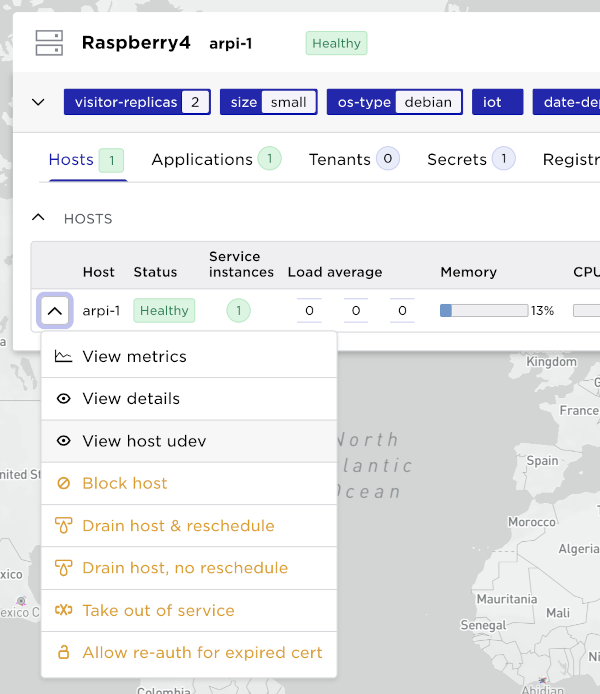
This list can be searched for devices.
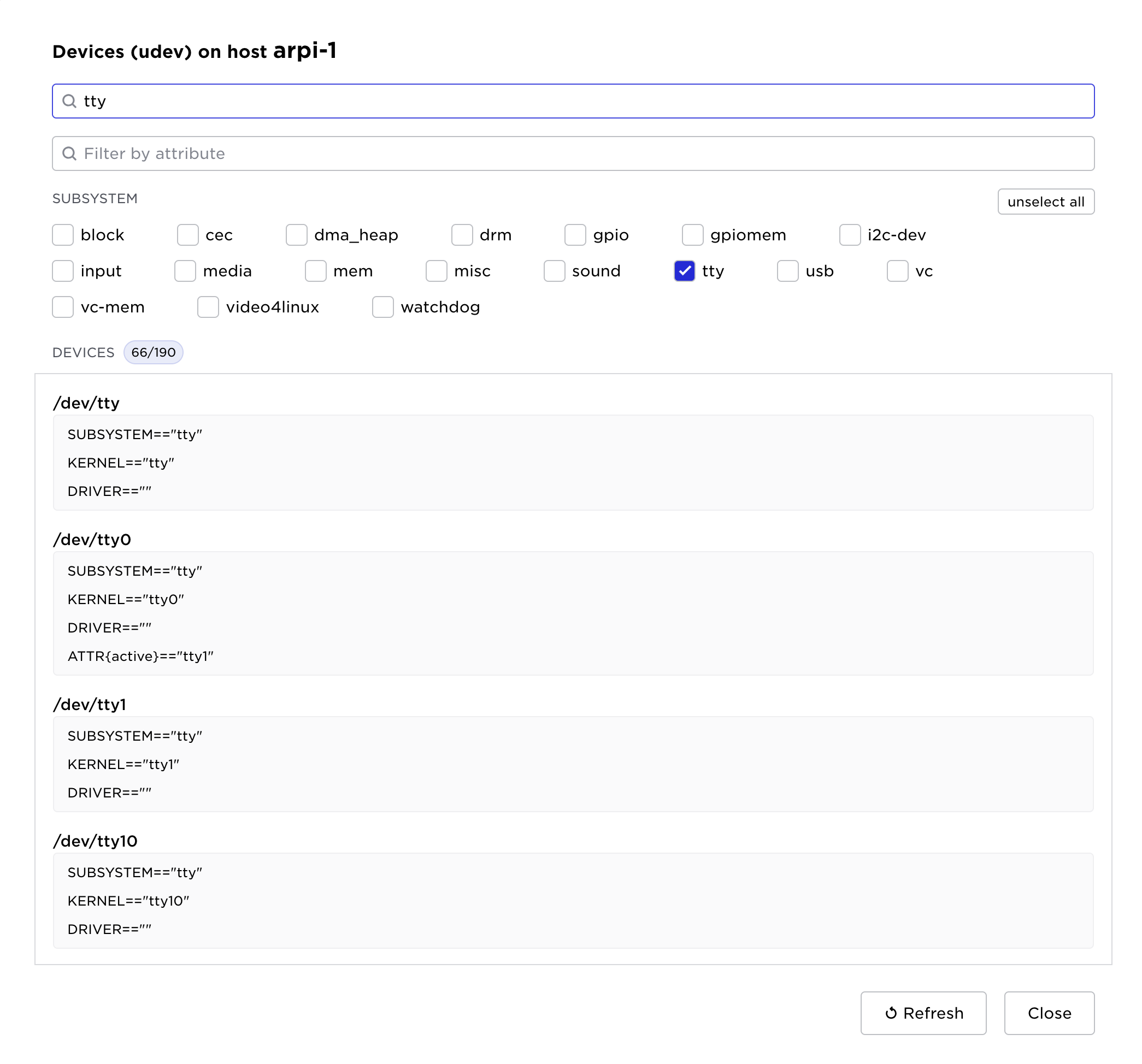
For the rest of this documentation, we will use these serial tty devices as example.
Declare what devices to search for
A system usually have a lot of devices in the device tree, most of those devices are probably not of interest to applications. The Edge Enforcer is configured by the site provider to scan for certain devices by using udev rules.
Taking a closer look at ttyS1:
udevadm info -ap /devices/platform/serial8250/tty/ttyS1
Udevadm info starts with the device specified by the devpath and then
walks up the chain of parent devices. It prints for every device
found, all possible attributes in the udev rules key format.
A rule to match, can be composed by the attributes of the device
and the attributes from one single parent device.

  looking at device '/devices/platform/serial8250/tty/ttyS1':
    KERNEL=="ttyS1"
    SUBSYSTEM=="tty"
    DRIVER==""
    ATTR{iomem_reg_shift}=="0"
    ATTR{console}=="N"
    ATTR{line}=="1"
    ATTR{xmit_fifo_size}=="0"
    ATTR{port}=="0x2F8"
    ATTR{uartclk}=="1843200"
    ATTR{type}=="0"
    ATTR{iomem_base}=="0x0"
    ATTR{custom_divisor}=="0"
    ATTR{io_type}=="0"
    ATTR{irq}=="3"
    ATTR{close_delay}=="50"
    ATTR{closing_wait}=="3000"
    ATTR{flags}=="0x10000040"

  looking at parent device '/devices/platform/serial8250':
    KERNELS=="serial8250"
    SUBSYSTEMS=="platform"
    DRIVERS=="serial8250"
    ATTRS{driver_override}=="(null)"

  looking at parent device '/devices/platform':
    KERNELS=="platform"
    SUBSYSTEMS==""
    DRIVERS==""
Above we can see what information udev has on the the ttyS1 device and its
parent device (serial8250).
These key/values are used when writing udev rules, i.e. rules that describes to the Edge Enforcer what devices should be discovered.
In the Avassa system, devices are mapped to device labels by pairing a device label name with udev rules that will match devices of interest.
This command shows a label rule, configured by the site provider, that
will create a device label called tty.
supctl show system resource-profiles tty-profile
...
device-labels:
  - label: tty
    udev-patterns:
      - SUBSYSTEM=="tty", DRIVERS=="serial8250", ATTR{console}=="N"
...
The rule tells the system to create a label called tty, all devices
matching the rule will be added to the tty device label.
The rules will match individual devices or parent devices:
- The
DRIVERSclause will match theserial8250which is the parent ofttyS1.
SUBSYSTEM=="tty"andATTR{console}=="N"will match thettyS1device itself.
I.e. there will be a match for rules that match a device or one of its parents.
Testing udev patterns interactively
When authoring udev-patterns, it is useful to verify that a pattern matches
the expected devices on a host before adding it to a resource profile. The
match-udev-patterns action reports which devices on a given host are
matched by a list of patterns and which patterns failed to parse.
supctl do system cluster hosts udc1-001 match-udev-patterns <<EOF
patterns:
  - 'KERNEL=="ttyS*"'
  - 'SUBSYSTEM=="tty"'
EOF
matches:
  - /dev/ttyS0
  - /dev/ttyS1
  - /dev/ttyS2
  - /dev/ttyS3
invalid-patterns: []
A device is included in matches if it matches any of the supplied patterns.
Patterns that fail to parse are reported in invalid-patterns together with
the reason and are skipped during matching:
supctl do system cluster hosts udc1-001 match-udev-patterns <<EOF
patterns:
  - 'KERNEL=="ttyS*"'
  - 'this is garbage'
EOF
matches:
  - /dev/ttyS0
  - /dev/ttyS1
  - /dev/ttyS2
  - /dev/ttyS3
invalid-patterns:
  - pattern: this is garbage
    reason: illegal udev pattern
For hosts in an edge site, run the action via the proxy with --site:
supctl do --site udc1 system cluster hosts udc1-001 match-udev-patterns <<EOF
patterns:
  - 'KERNEL=="ttyS*"'
EOF
As a site provider, when looking at the udc1 site (assuming that that
tty-profile is applied to this site), we can see what devices were actually
discovered and at what hosts.
The discovered devices are only available at the site.
supctl show --site udc1 system cluster hosts \
    --fields hostname,device-labels,devices
- hostname: h05
  device-labels:
    tty:
      - /dev/ttyS1
      - /dev/ttyS2
      - /dev/ttyS3
    rtc: /dev/rtc0
  devices:
    - name: /dev/ttyS3
      labels:
        tty: /dev/ttyS3
    - name: /dev/ttyS2
      labels:
        tty: /dev/ttyS2
    - name: /dev/ttyS1
      labels:
        tty: /dev/ttyS1
    - name: /dev/rtc0
      labels:
        rtc: /dev/rtc0
There you see that the system discovered the following devices for the tty
label.
/dev/ttyS1/dev/ttyS2/dev/ttyS3
Controlling access to to devices
The site provider's applications have access to all discovered devices.
With device discovery in place, we now need to control what applications can access these devices, this is done by defining resource profiles.
We use a application owner tenant, acme, as example here.
supctl show tenant-resource-profiles t-acme-udc1-medium
- name: t-acme-udc1-medium
  device-labels:
    - name: rtc
    - name: tty
t-acme-udc1-medium will allow access to device-labels rtc and tty.
supctl show tenant-resource-profiles t-acme-udc2-medium
- name: t-acme-udc2-medium
  device-labels: []
Since device-labels is an empty list, t-acme-udc2-medium, when attached
to a site, will block all devices labels from being available.
These resource profiles are attached to sites as follows:
supctl show tenants acme assigned-sites \
    --fields name,tenant-resource-profile
- name: udc1
  tenant-resource-profile: t-acme-udc1-medium
- name: udc2
  tenant-resource-profile: t-acme-udc2-medium
If we, as acme (i.e. as an application owner) look at what device labels are available in each site. Please note that the system does not report on what hosts the devices were discovered.
supctl show --site udc1 assigned-sites udc1 \
    --fields name,tenant-resource-profile,device-labels
name: udc1
tenant-resource-profile: t-acme-udc1-medium
device-labels:
  tty:
    - /dev/ttyS1
    - /dev/ttyS2
    - /dev/ttyS3
  rtc: /dev/rtc0
In udc1 we see devices according to the tty and rtc device discovery rules.
supctl show --site udc2 assigned-sites udc2 \
    --fields name,tenant-resource-profile,device-labels
name: udc2
tenant-resource-profile: t-acme-udc2-medium
device-labels: {}
In udc2, acme doesn't have access to any devices.
If we modify t-acme-udc2-medium to allow e.g. rtc devices:
supctl show tenant-resource-profiles t-acme-udc2-medium
name: t-acme-udc2-medium
device-labels:
  - name: rtc
Again, look at the site, as acme:
supctl show --site udc2 assigned-sites udc2 \
    --fields name,tenant-resource-profile,device-labels
name: udc2
tenant-resource-profile: t-acme-udc2-medium
device-labels:
  rtc: /dev/rtc0
Using devices in applications
To mount particular devices in a application you declare what device labels are of interest in the application specification.
The site scheduler will try to find hosts with matching devices and start the container there.
A simple example:
name: alpine
version: "1.0"
services:
  - name: my-srv
    containers:
      - name: alpine
        image: alpine
        cmd: ["sleep", "infinity"]
        devices:
          device-labels:
            # Tell the system that we want access to devices with label
            - tty
        # Run in the hosts namespace to be able to access /dev
        user-namespace:
            host: true
        env:
          # Define an environment variable that will be available in the container
          TTY_DEV: ${SYS_HOST_DEVICE_LABELS[tty]}
    mode: replicated
    replicas: 1
After deploying this to udc1 and udc2
supctl show --site udc1 applications alpine service-instances
- name: my-srv-1
  application-version: "1.0"
  oper-status: running
  ready: true
  host: udc1-002
  application-network:
    ips:
      - 172.26.0.1/16
  gateway-network:
    ips:
      - 172.25.255.2/24
  ingress:
    ips: []
  containers:
    - name: alpine
      id: a4c15b840f4f
      oper-status: running
      ready: true
      start-time: 2022-09-20T08:35:32.626Z
      current-restarts: 0
      total-restarts: 0
      probes:
        startup:
          status: success
        readiness:
          status: success
        liveness:
          status: success
      devices:
        - /dev/ttyS1
        - /dev/ttyS2
        - /dev/ttyS3
note, udc2 does not have access to any tty devices, hence the application
can not be started.
supctl show --site udc2 applications alpine service-instances
- name: my-srv-1
  oper-status: not-scheduled
  not-scheduled-reason: no-device-label-match
  error-message: all required devices not present on node
If the devices available to the tenant are changed later, by discovering new
devices or by modifying a resource profile, a service instance that is not
scheduled, such as my-srv-1 on udc2 above, is scheduled once the devices it
requests become available to it. A service instance that is already running
keeps the devices it was given when it was scheduled: the new set of devices is
applied when the service instance is rescheduled. See when resource changes
take effect.
Example: Mixed hardware on Raspberry Pi
Consider a fleet of Raspberry Pi 4 hosts, each connected to a different combination of peripherals: a USB barcode scanner, 1-Wire thermometers, SPI sensors, and hardware controlled through GPIO. We would like the same application specification to run on all of them, mounting whatever subset of the hardware happens to be attached on each host.
A single label that catches all peripherals
Rather than declaring one device label per peripheral type, a single label
with a list of udev-patterns can be used to cover all the devices of
interest. A device is added to the label if it matches any of the patterns,
so a host that only has GPIO and a barcode scanner gets only those devices,
while a host with the full set gets them all. The application specification
remains the same in both cases.
supctl show system resource-profiles hw-access
name: hw-access
device-labels:
  - label: cellar
    udev-patterns:
      - ATTRS{name}=="Barcode Reader"
      - SUBSYSTEM=="gpio"
      - SUBSYSTEM=="gpiomem"
      - SUBSYSTEMS=="spi"
system-volumes:
  - name: sys-devices
    path: /sys
    mode: read-write
The match-udev-patterns action is
useful when developing patterns like these; run it on each host variant to
confirm that the patterns pick up the expected devices.
Hardware accessed via /sys
Some peripherals are not exposed under /dev and instead surface through
entries in /sys. 1-Wire thermometers on the Raspberry Pi, for example,
appear as files under /sys/bus/w1/devices/. To make these accessible to
the application, declare a system volume that bind-mounts /sys into the
container. The resource profile above defines sys-devices as a
read-write mount of /sys. The application then references the system
volume in its volumes and mounts sections:
name: hw-access
version: "1.0"
services:
  - name: hw-srv
    containers:
      - name: app
        image: my-registry/hw-access:1.0
        devices:
          device-labels:
            - cellar
        mounts:
          - volume-name: sys
            mount-path: /sys
        # Run in the host's user namespace so that root inside the
        # container can access GPIO, SPI, 1-Wire, and other hardware
        # without changing permissions on the host.
        user-namespace:
          host: true
    volumes:
      - name: sys
        system-volume:
          reference: sys-devices
    mode: replicated
    replicas: 1
Granting privileges to access the hardware
GPIO, SPI, and most other hardware on Linux requires root privileges to access. One way to handle this is to run a privileged init script that chowns or chmods the device nodes at startup, but a simpler approach is to run the container in the host's user namespace, so that uid 0 inside the container is uid 0 on the host:
user-namespace:
  host: true
With this setting in place, accesses to /dev/gpiochip*, /dev/spidev*,
the barcode scanner's tty device, and the /sys entries succeed without
any additional permission tweaks on the host.